• Home
  • MAC
  • Virtual Machines
    • VMware
    • VirtualBox
  • Windows
  • Linux
  • Downloads
    • ISO Files
      • Open Mamba ISO
      • AnduinOS ISO
      • Windows 7 ISO
      • Windows 11 ISO
    • macOS DMG
    • macOS ISO
    • macOS VMDK
    • VMware Workstation Pro
    • macOS Unlocker
    • DirectX 12
    • MSI Afterburner
    • Hyper-V Server 2019
  • Others
    • Android
    • Discord
    • iOS
    • Internet
GEEKrar
  • Home
  • MAC
  • Virtual Machines
    • VMware
    • VirtualBox
  • Windows
  • Linux
  • Downloads
    • ISO Files
      • Open Mamba ISO
      • AnduinOS ISO
      • Windows 7 ISO
      • Windows 11 ISO
    • macOS DMG
    • macOS ISO
    • macOS VMDK
    • VMware Workstation Pro
    • macOS Unlocker
    • DirectX 12
    • MSI Afterburner
    • Hyper-V Server 2019
  • Others
    • Android
    • Discord
    • iOS
    • Internet
No Result
View All Result
  • Home
  • MAC
  • Virtual Machines
    • VMware
    • VirtualBox
  • Windows
  • Linux
  • Downloads
    • ISO Files
      • Open Mamba ISO
      • AnduinOS ISO
      • Windows 7 ISO
      • Windows 11 ISO
    • macOS DMG
    • macOS ISO
    • macOS VMDK
    • VMware Workstation Pro
    • macOS Unlocker
    • DirectX 12
    • MSI Afterburner
    • Hyper-V Server 2019
  • Others
    • Android
    • Discord
    • iOS
    • Internet
No Result
View All Result
GEEKrar
No Result
View All Result
Home Windows

MediaCreationTool.bat: Download Windows 11 ISO images and bypass compatibility checks

Ruby Singh by Ruby Singh
May 31, 2025
in Windows
0
MediaCreationTool.bat: Download Windows 11 ISO images and bypass compatibility checks
120
SHARES
1.7k
VIEWS
Share on TwitterShare on Facebook

MediaCreationTool.bat is an open-source script that supports downloading Windows 11 and the latest versions of Windows 10, including Windows 10, version 21H2.

MediaCreationTool.bat is a useful Windows script for loading Windows ISO images from Microsoft servers.

The developer recently updated the program. The latest version supports loading Windows 11 ISO images and adds a standalone script to bypass Windows 11 compatibility checks.

Install Windows 11 on Unsupported PC: Bypass “This PC can’t run Windows 11” error.

We published a review of MediaCreationTool in March 2021, when the developer added support for Windows 10, version 21H1.

The latest version includes support for booting a Windows 11 ISO image from Microsoft servers. Most likely, Microsoft will update its Media Creation Tool on the day of Windows 11, October 5, 2021. Microsoft’s utility helps copy the operating system to a USB drive or creating an ISO image for subsequent burning to a DVD but has limited functionality.

MediaCreationTool.bat is an open-source script that supports downloading Windows 11 and the latest versions of Windows 10, including Windows 10, version 21H2.

The user only needs to run a script with elevated privileges to download the desired ISO image from Microsoft servers.

How to Create Bootable Windows 11: 2 Step Easy Guide

The process of loading the script may seem more complicated than usual:

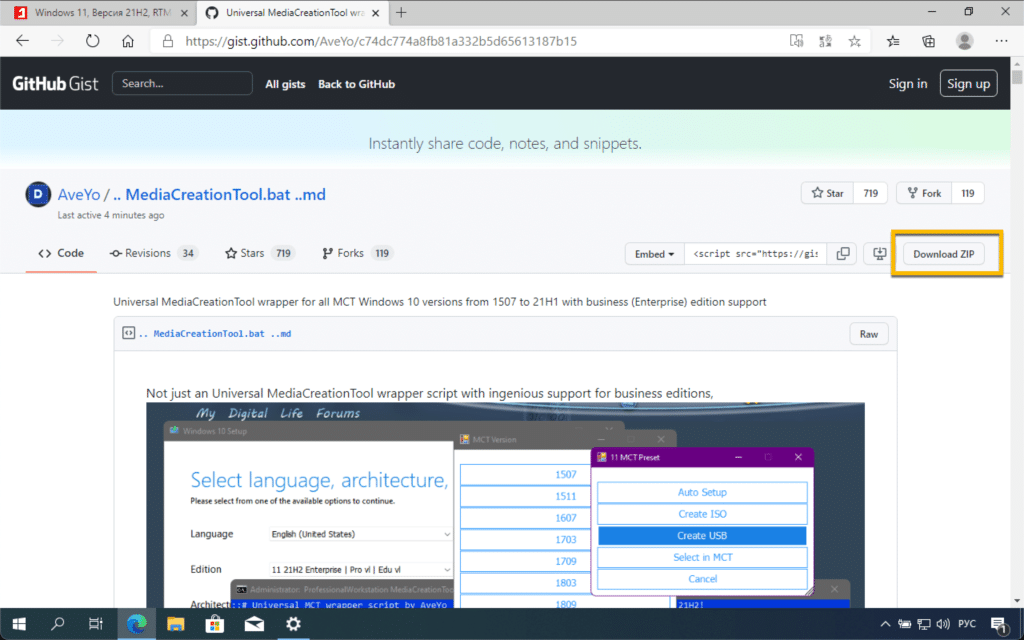
  • Go to the project site on GitHub.
  • Make sure you’re using a high screen resolution (the download button doesn’t appear at low resolutions). Click the Download Zip button to download the entire archive to the local system.
  • Unpack the downloaded archive.
  • Right-click on the MediaCreationTool script file.bat and select the Run as administratormenu option.
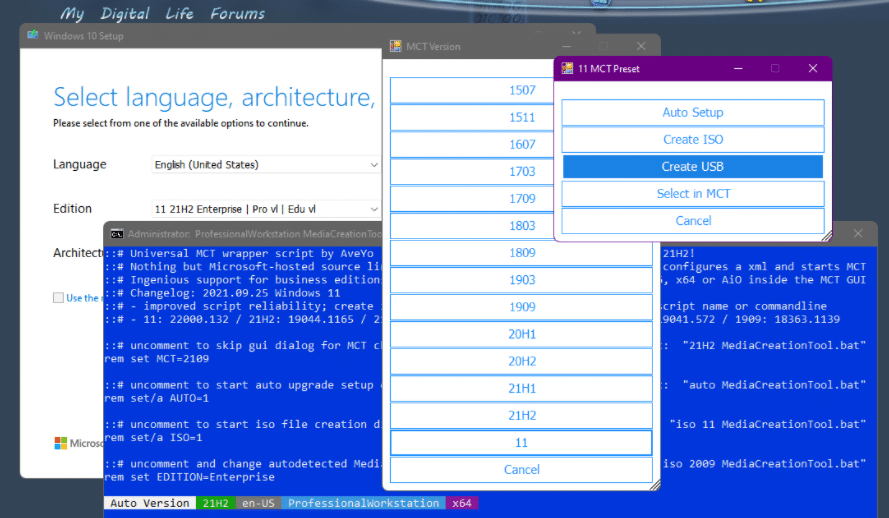
The script will display all versions of Windows available for download. Select a specific version, such as Windows 11, Windows 10, version 21H2, or something else.

The following screen shows several available options. The Create ISO and Create USB options speak for themselves: the first operation allows you to download the ISO image and the second copies the contents of the image to a USB drive.

  • Auto Setup: Automatic update without prompts, with the ability to select a version and roll back.
  • Create ISO: Create an ISO image directly through the DIR2ISO snippet, including any OEM settings.
  • Create USB: Create a USB drive through your own MediaCreationTool, including any OEM settings.
  • Select in MCT: Option for standard MediaCreationTool processing without changing OEM settings.

The unpacked archive contains another file that will be useful for some users. The Skip_TPM_Check_on_Dynamic_Update.cmd batch file configures the system to prevent TPM validation when installing Windows 11.
Note: Microsoft recently released an updated PC Health Check tool that reports why the device is incompatible with Windows 11.

How to Download and Install Windows 11 ISO (32, 64 Bit) from Microsoft?

MediaCreationTool.bat includes several features that are missing from the original MediaCreationTool utility created by Microsoft. In addition, the tool supports downloading older versions of Windows 10, and a separate batch file can be useful on systems where the installation is blocked due to compatibility issues.

Are you planning to upgrade your PC to Windows 11?
Previous Post

8 Methods to Optimise Mac’s Performance

Next Post

How to Create Bootable Windows 11: 2 Step Easy Guide

Ruby Singh

Ruby Singh

Next Post
How to Create Bootable Windows 11: 2 Step Easy Guide

How to Create Bootable Windows 11: 2 Step Easy Guide

Leave a Reply Cancel reply

Your email address will not be published. Required fields are marked *

No Result
View All Result

Recent Articles

  • Download macOS Golden Gate Wallpaper (Official & High-Resolution)
  • Download macOS Golden Gate Installer: How to Install?
  • Download macOS Golden Gate ISO for VMware
  • Download macOS Golden Gate DMG for Clean Installation
  • Download Tiny11 26H1 ISO for Windows 11: Older Versions Available
  • Download VMware Workstation Pro 26H1 (Windows | Linux): Direct Downloads
  • Download macOS Unlocker for VMware Workstation Pro 26H1 | Old Versions Available
  • Best Way to Download macOS Big Sur ISO Image (Latest Version: 11.7.11)
  • Download macOS Big Sur DMG File (Latest Version: 11.7.11)
  • macOS Big Sur Download VMDK File | (Latest Version: 11.7.11)
Facebook Twitter Youtube

Browse by Category

  • Android (15)
  • Discord (3)
  • Downloads (17)
  • Featured (7)
  • Internet (42)
  • iOS (16)
  • Linux (10)
  • Mac (153)
  • Virtual Machine (31)
  • VirtualBox (81)
  • VMware (67)
  • Windows (80)

Downloads

Download macOS DMG
Download macOS ISO
Download macOS VMDK
Download Windows ISO

GEEKrar

We are a team of skilled writers, editors and tech enthusiasts that help you how to get tech into work, pros and cons, explain hows and whys, hacks, and fixes of new modern tech.

© 2026 geekRAR.com

We use cookies on our website to give you the most relevant experience by remembering your preferences and repeat visits. By clicking “Accept”, you consent to the use of ALL the cookies.
Do not sell my personal information.
Cookie settingsACCEPT
Manage consent

Privacy Overview

This website uses cookies to improve your experience while you navigate through the website. Out of these, the cookies that are categorized as necessary are stored on your browser as they are essential for the working of basic functionalities of the website. We also use third-party cookies that help us analyze and understand how you use this website. These cookies will be stored in your browser only with your consent. You also have the option to opt-out of these cookies. But opting out of some of these cookies may affect your browsing experience.
Necessary
Always Enabled
Necessary cookies are absolutely essential for the website to function properly. This category only includes cookies that ensures basic functionalities and security features of the website. These cookies do not store any personal information.
Non-necessary
Any cookies that may not be particularly necessary for the website to function and is used specifically to collect user personal data via analytics, ads, other embedded contents are termed as non-necessary cookies. It is mandatory to procure user consent prior to running these cookies on your website.
SAVE & ACCEPT
No Result
View All Result

© 2026 geekRAR.com

Go to mobile version